

Why Your Customers Must Find You on Google
In today’s world, when you need anything you first go to Google and Search. Isn’t it?
Mechanic near me?Google
Good salon near me?Google
Weather you are looking for bakery, tuitions, yoga classes, pet clinics, dentist, plumber, you simple google it.
Likewise, if you are running a shop, providing a service, or selling products, your customers are already search for business like yours.
But the question is:
Are they finding you… or your competitors?
Many Indian business owner thinks that:
Promoting business on Google means running ads and we don’t have enough budget for it.
This is not true.
You can promote your business on Google for Free and Google provides many tools to support on your promotion.
Good news is you don’t need to be from technical background nor you need big budget.
In this blog, we will learn exactly how Google works and How to Advertise your Business on Google for Free and how to attract more customers.
Firstly, let’s look at what “free advertising on Google” actually mean.
When you hear word advertising, many might be thinking of paying money for ads.
But Google offers below free tools to promote your business:
Google Search ( when your customers for your business name and services)
Google Maps ( when your customers are seaching “near me”)
Local results ( like “pet clinic in secunderabad” or “dentist in kondapur”)
These tools are 100% free.
You only need to set them up correctly and keep them active.
Step 1: Create & Optimize Your Google Business Profile (Most Important Step!)
If you want your customer to find you on Google, this is your biggest oppurtunity.
Google Business Profile(earlier called Google My Business) is a free tool offered by Google to list your business on Google Search and Google Maps.
Why it is important for your Business?
- It shows your business when people search “near me”.
- It helps people call you directly from Google.
- It builds trust because customers can see photos and reviews.
- It appears even if you do NOT have a website.
Even if you are a small shop owner, an agent, home business owner, or service provider , Google Business Profile is for you.
How to Create Your Google Business Profile
- Go to Google and type: Google Business Profile.
- Click “Start now”.
- Sign in with your Gmail ID.
- Add business details.
- Business Name (avoid spelling mistakes)
- Category (e.g., “bakery”, “yoga studio”, “clinic”)
- Address
- Phone number
- Business hours
- Website (optional)
- Verify business (Google may call or send a postcard).
That’s it.
You now have a digital presence on Google.
Now optimise your Business Profile.
Add Real Photos (People Trust What They See)
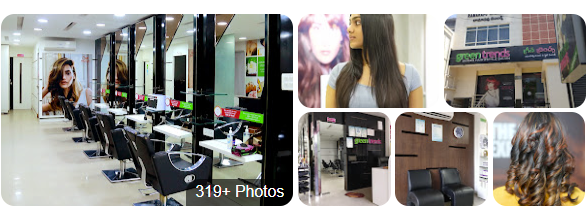
Your customer heavily rely on visuals, they need to see the images and videos before they make a decision.
A shop with good photos gets more:
- Calls
- Visits
- Trust
- Reviews
- Conversions
Tips to follow while adding photos and videos.
- Add Image of your shop exterior where you business name and details are clearly visible.(so people can recognise from outside)
- Interior Photos of your shop with good lighting.
- Your products
- Photo of you staff
- Photo of you working with customer
- Before/after images( especially if you are into service business like salon, makeup, interior design, cleaning etc)
- It would be best if you can add video showcasing from your exteriors to your interior shop.
Add Your Products or Services
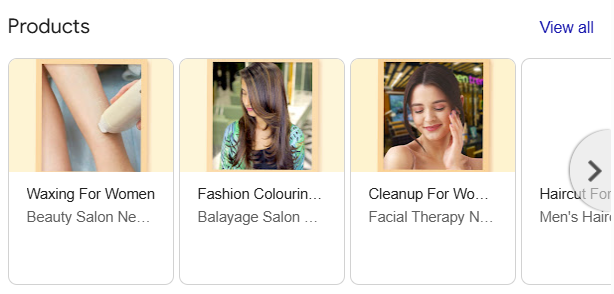
Adding what product and services you are offerings makes your profile more complete and helps you appear on more searches.
Examples:
A salon can list:
- Haircut
- Hair spa
- Bridal makeup
- Facial
A bakery can list:
- Birthday cakes
- Cookies
- Cupcakes
- Custom orders
A yoga teacher can list:
- Hatha Yoga sessions
- Senior yoga classes
- Kids yoga
- Corporate yoga
Why this is important?
Because when your customers are searching:
“Bridal makeup in Hyderabad” your business can appear first.
Post Updates Regularly
You know just like Instagram, you can post on Google.
Post about your:
- Offers
- Events
- New stock arrival
- Discounts
- Festival specials
These posts show up when people view your profile.
Example:
A saree boutique posted a Sankranti offer on their Business page.
Within 3 days, they got 31 direction requests.
Get Reviews (Your Secret Weapon)
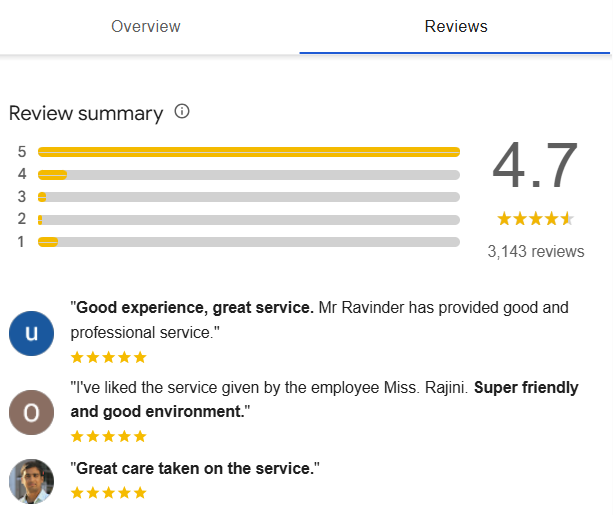
Reviews decide whether customers trust you or choose your competitors. This is very very important process you need to follow regularly. Guide your team also to always ask for reviews from your customers.
How to get reviews easily?
- Ask customers politely after you provide your service.
- Keep QR scanner in your shop so it’s easy for your customers to give reviews quickly.
- Even if they have missed, send them your review link.
- Offer a small incentive like 5% off on next purchase.
- Request them to upload photos in reviews.
Why photos in reviews matter?
Google pushes listings with photo reviews higher.
Reply to Every Review
When you get any review always reply them. A simple “Thank you” is also enough.This tells Google your business is active.
Even if you get a negative review, it becomes very important that you reply them immediately and try to solve their problems. In exchange, once your customers are happy and satisfied ask them to rewrite the review.
Step 2: Make Your Business Easy to Find on Google Maps
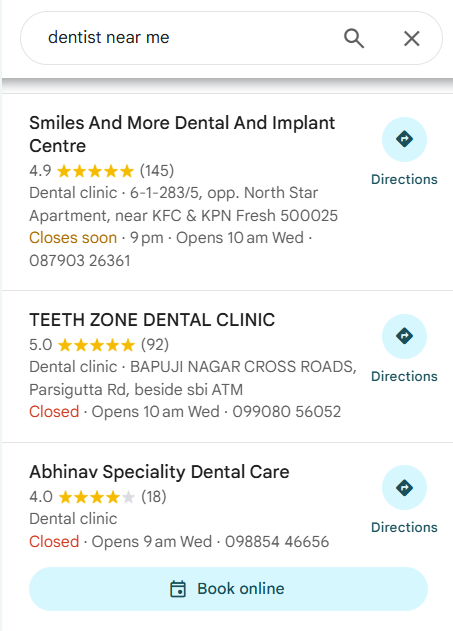
Google Maps is extremely powerful for your local businesses.
People search:
- “parlour near me”
- “cafe near me”
- “mobile repair near me”
- “best tiffin service near me”
Maps show results instantly, and most of your customer click the top 3 results.
How to rank higher on Maps?
- Complete your Google Business Profile
- Add at least 15–20 photos
- Get 10+ reviews
- Keep your timings accurate
- Add proper categories
- Ask customers to check-in or upload photos
Step 3: Add Your Business to Popular Indian Directories
This is super simple.
Just add your business to these free platforms:
- JustDial
- Sulekha
- IndiaMart
- OLX
- Facebook Page
- Instagram Page
- WhatsApp Business
- Local RWA pages
Why?Because Google sees all these as proof that your business is real.
More listings → More trust → Higher ranking.
Step 4: Use Free Google Tools to Track Growth
You don’t need technical knowledge to track.
Google Business Insights shows:
- How many people viewed your profile
- How many clicked “Call”
- How many requested directions
- What keywords people searched
This helps you understand what is working.
Example:
A boutique saw “lehenga near me” was their top search keyword.
They added more lehenga photos → their profile engagement increased.
Step 5: Use Google Merchant Center (Only if You Sell Products)
If you sell products like:
- Clothes
- Home décor
- Handicrafts
- Fashion accessories
- Electronics
- Beauty products
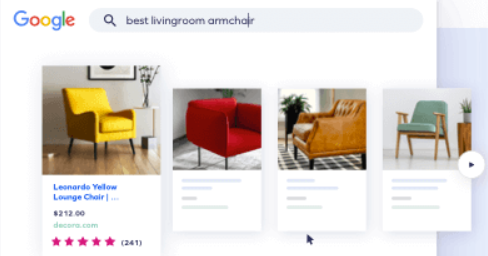
You can list your products for free in Google Shopping.
This helps you appear in product search results.
When someone searches “red designer kurti”, your product can appear for free.
You only need:
- Product photos
- Price
- Description
Step 6: Stay Active & Consistent
This is where most business owners fail.
They create their Google profile…
and then forget it.
Google LOVES active businesses.
Do these regularly to keep your business profile active
- Add new photos every week
- Get reviews every month
- Update holidays and timings
- Post offers regularly
- Reply to customer questions
- Add new products or services
- Consistency beats everything.
Things to keep in mind so your customers always find you on Google.
Active Gmail:
Always keep you Gmail logins with you and gmail active. Many business owner does this mistake of forgetting they login details.
If you forget your login details, it becomes difficult to access you business page.
Business name with Keyword:
Add the keyword along with your Business name. Keyword is the term your customers are using to search on Google.
Example: If you have a pet clinic from Banjara Hills, your business name could be:
ABC | Pet clinic in Banjara Hills
Phone Number:
One of the main reason you are loosing your customers is because you have not mentioned your phone number. Many business owner does this mistake. Your customer wants to reach you but know to how.
So it is very important that you regularly check that your business profiles shows your phone number. Also, keep your phone active and fully charged.
Address:
Your customer has seen your business and decided to give a visit to your shop. They clicked on address and it did not give them right address of your shop. It’s a disaster right.
You don’t want to lose your customer for such a silly reason. Always give the right location details and cross check with your team that address is mapping correctly.
Website:
If you have a website, it is recommended to add you website to build more credibility.
Posting Consistently:
Google loves the pages who post consistently. Update your customers of every new offer, new arrivals.
Utilize the Q&A Section:
On your Google Business Profile, customers can ask questions about your business. Be sure to monitor and answer these promptly and accurately. You can even proactively add frequently asked questions and their answers.
If you complete all of these steps correctly, you will be successful with your online business presence.
But frankly speaking, Most Indian business owners don’t have time to:
- Update Google profile
- Add photos
- Post offers
- Reply to reviews
- Track insights
- Rank higher on Google Maps
- Create content
- Maintain consistency
And that is completely normal.
Your job is to run your business not spend hours on building digital presence.
This is where Trielevate helps.
We manage everything for you:
✔ Set up & optimize your Google Business Profile
✔ Improve your Google Maps ranking
✔ Collect and manage reviews
✔ Create posts, offers, announcements
✔ Add photos and update your details
✔ Track performance and provide insights
✔ Help your business get more calls, visits & customers
So you don’t have to worry about:
- Complicated digital marketing
- Google updates
- Technical settings
- Losing customers to competitors
You simply focus on delivering great service,
And we make sure customers find you on Google.
You now have a complete, simple, beginner-friendly guide to promote your business on Google for free.
Just follow the steps consistently, and you’ll start seeing real results – more calls, more visits, more customers.
If you ever feel overwhelmed or want experts to handle everything for you, Trielevate is here to help.